






Family reunions
Three generations and a dozen phones. One link in the family group chat gathers everything, and relatives who couldn't travel can still browse the gallery from home.
HeyGrats works like an app but opens as a web page, so guests go from QR code or link to uploading in a couple of taps. Every photo lands in one shared gallery, and a live photo wall is there when you want one.
Press Add photos on the phone, or drop a photo on the wall. It stays on your device and is never uploaded.
Mia & Leo
12 October 2026
Live · 127 photos


heygrats
01Why browser-based
Most photo sharing apps ask every guest to find the app, install it, make an account and join your event before they share a single picture. Plenty stop at step one. HeyGrats is an event photo sharing app that runs as a web page instead: the QR code or link opens it in Safari or Chrome, and all that is left for a guest to do is choose photos.
That matters most at mixed events: grandparents and teenagers, colleagues on locked-down work phones, friends who flew in for the weekend. Everyone gets the same short path, and you get their photos in one place instead of spread across group chats and cloud albums. Our guide to the best way to collect event photos compares the options.
02How it works
Set it up once. Guests do the rest from their own phones, before, during and after the event.
01
Name the event and you get a guest link and QR code straight away. The free plan runs the whole flow, with no card needed.
02
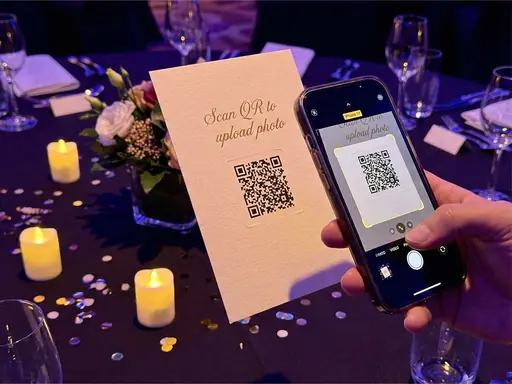
Put it in the invitation email, the group chat and on printed signs. Guests keep adding photos for as long as the event is open.
03
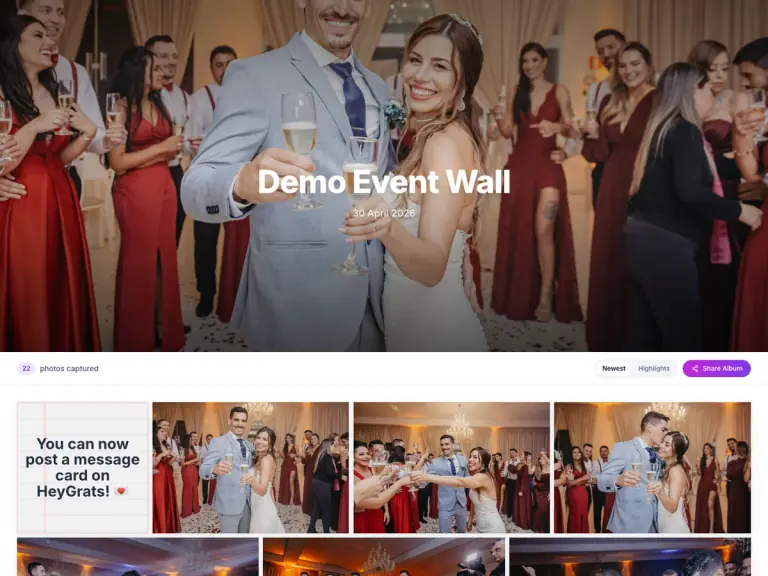
Approved photos fill one gallery. Guests save their favourites, and paid plans add a single ZIP download of the whole set for you.
03Use cases
Any gathering where lots of people take photos and nobody wants to chase them afterwards.
Three generations and a dozen phones. One link in the family group chat gathers everything, and relatives who couldn't travel can still browse the gallery from home.
Parents photograph the same ceremony from different seats. A shared gallery gives every family the angles they missed, and paid plans let you approve each upload before it is shown.
Volunteers, performers and visitors all shoot the same day. Gather it in one place and next year's flyer photos are already sorted by event, not scattered across phones.
Colleagues share photos from the send-off and write a note in the digital guest book, so the guest of honour goes home with pictures and messages together.
04Features
The guest side stays short. The organizer side keeps everything together.
iPhone or Android, Safari or Chrome. Guests tap the link or scan the code and they are on the upload page.
Guests don't create an account or log in to share. A browser cookie remembers their uploads so they can come back and see them.
Guests pick a handful of photos from their camera roll and send them together. iPhone HEIC pictures are converted automatically.
Approved uploads land in one gallery, which splits into before, on and after the day once it fills up. Guests can filter it to their own photos.
Guests save individual photos from the gallery. Paid plans add Download All as a ZIP file for the host.
Open the display link on a TV or projector and the same uploads play on screen during the event.
05Buyer's checklist
Whichever tool you choose, check these before sending the link to a hundred guests. Here is how HeyGrats answers each one.
Not with HeyGrats. The QR code or link opens a web page, which removes the step where most guests drop out.
No. Guests upload without signing up. If they want the album later, they can leave an email after uploading and get the gallery link once the event is over.
Photos are resized in the browser before upload so they send quickly on busy venue Wi-Fi. With a Premium Pass or Host Annual, they are kept at full quality instead.
Anyone with the event link can open the gallery, which shows approved photos only. There is no password, so share the link with your guests rather than posting it publicly.
Each plan keeps an event open for a set period, listed on the pricing page. Download what you want to keep before then; paid plans make that a single ZIP.
HeyGrats adds a live photo wall and a digital guest book. Comparing tools? Read Kululu vs HeyGrats and GUESTPIX vs HeyGrats.
06Keep reading
No. It is a web app. Guests and organizers use it in the browser on a phone, tablet or computer, so there is nothing to install or update.
They scan the event QR code or tap the event link. Either one opens the upload page, where they can take a photo or choose several from their phone.
Yes, while the event is open. How long that lasts depends on the plan, and paid Event Passes keep an event open longer than the free plan.
Yes. Each event gets its own link, QR code and gallery. The free plan covers a few events at once, and subscriptions suit hosts who run events all year.
Yes. Guests open the gallery and save the photos they like, one at a time. The host can download the whole collection as a ZIP on a paid plan.
Photos, in the formats phones use, including iPhone HEIC. The guest page is built for pictures rather than video, and Message Cards let guests add a written note instead.
Your event, tonight
Create a free event gallery, share the link, and let every guest add their photos to one place.