

For most events, the photos start long before anyone points a camera at the dance floor. They start with the invitation: the moment a guest finds out there’s something to look forward to.
Until now, HeyGrats picked up the story on the day itself. Guests scanned a QR code, their photos landed on the live wall, and everything ended up in the album afterwards. The invitation lived somewhere else entirely, in a separate RSVP site, a spreadsheet, or a long scroll of “yes!” replies in a group chat.
Today that changes. Guest Invitations brings the invitation into the same place as your photo wall and album, so the whole event, from “you’re invited” to the last photo, lives with HeyGrats.
What’s new
Invitations live in a new Invitations tab inside Event Settings. From there you can:
- Send invitations by email. Paste your guest list, with names if you have them, and send everyone a personal invitation.
- Share one link with everyone else. Not every guest is on email. A single RSVP link works in WhatsApp, Messenger, a text, or anywhere else you can paste a link.
- Write the invitation itself. Add who it’s for, who’s hosting, the time, the venue, the address, and even a running order for the day.
- See who’s coming at a glance. Invited, awaiting reply, attending and declined, all counted for you.
- Hear when guests reply, in your dashboard, by email, or both.
How it works for hosts
1. Set up your invitation
Open your event, go to Event Settings → Invitations, and fill in what your guests need to know: who the event is for, who’s hosting, when it starts and ends, the venue and the address. If your day has several parts, say a ceremony, then dinner, then dancing, add them as a running order with their own times and places.
A live preview sits right beside the form, so you can watch the invitation take shape as you type. Anything you haven’t filled in shows up as a gap in the preview, which makes it easy to spot what’s missing before a guest does. Your changes save automatically.
2. Invite your guests
There are two ways to reach people, and most hosts will use both.
By email: paste your guest list straight from a spreadsheet, one guest per line, with or without names. HeyGrats tidies the list before anything goes out. Duplicates are merged, and any line without an email address is pointed out to you by line number, so the number on the send button is exactly the number of invitations that will be sent. You can paste up to 250 addresses at a time.
By link: copy your event’s RSVP link and drop it into the family group chat, a social post or a text message. In most chat apps it appears as a proper invitation card rather than a bare web address.
3. Choose what to ask
By default, guests simply tell you whether they’re coming. If you need a little more, you can switch on:
- How many are coming, a number your caterer can actually use.
- Email address and phone number on the shared link, each set to off, optional or required.
You can also set a date when replies close. After that date, the link still shows the invitation but stops taking answers. Clear the date and replies open again.
4. Watch the replies come in
The Invitations tab shows your counts at the top and your guest list underneath, with the people who haven’t answered listed first, since they’re the only ones you might still need to nudge. Guests who joined by scanning your QR code are counted separately, so they never show up as “awaiting reply”.
Turn on reply notifications and you’ll hear about each answer in your dashboard, by email, or both.
What your guests see
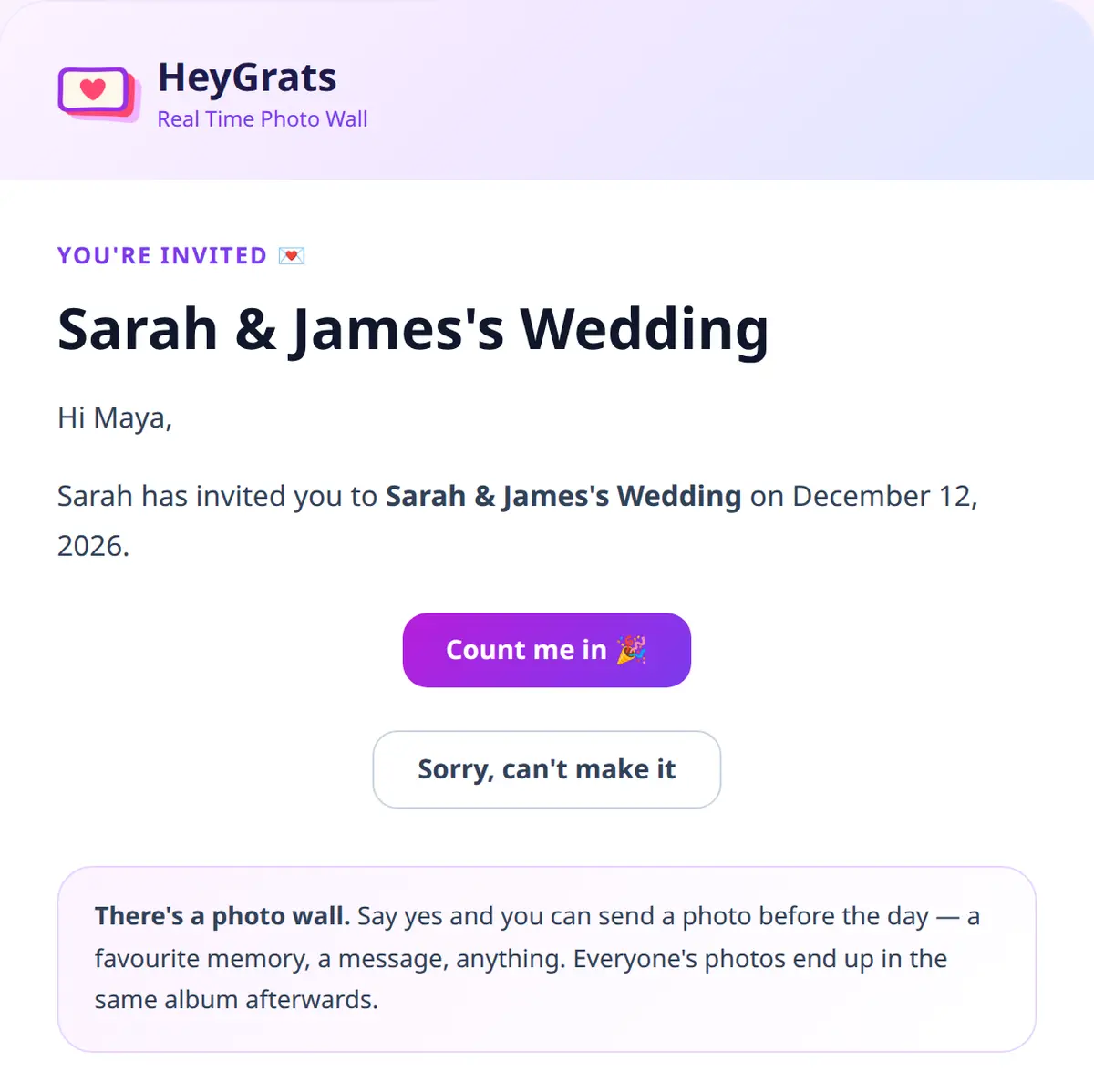
Guests invited by email get a short, friendly message with two buttons: Count me in or Sorry, can’t make it. There’s no account to create and no app to download.
The invitation page has everything they need for the day:
- The date, the time, the venue and your running order
- Get directions, straight into their maps app
- Add to calendar, so the date doesn’t slip
- A countdown to the big day
- A peek at the photos already in the album (hidden for private events)
And because this is HeyGrats, the invitation doesn’t stop at “yes”.
Photos before the day
This is the part we’re most excited about. When a guest says yes, they can send a photo straight away: a favourite memory with the couple, a throwback from school, a snap from the last family holiday. If you have Message Cards turned on, they can leave a written wish too.
Those early contributions go into the same album as everything taken on the day and after it. Once there are enough photos, the album groups them into before, during and after the event, so your album already has a story to tell by the time the doors open.
Pro tip: Mention it in your own words when you share the link. Something like “Send us your favourite photo of us before the wedding!” gives guests a reason to open the invitation today, not the night before.
Built with care for your guest list
Invitations go to people who never signed up for anything. They’re your friends and family, so we built this to treat them that way.
- No accidental replies. Some work email systems automatically open every link in a message. Opening an invitation link never counts as an answer on HeyGrats; a guest has to tap to confirm, so your list won’t fill up with phantom “attending” replies.
- No overwriting someone else’s answer. Anyone can use the shared link, but once a guest has replied, nobody else can change their answer by typing in their email address.
- Your guest list stays private. An invitation link can’t be used to check whether someone is on your list.
- Deliberately simple. There are no meal choices, dietary forms or seating charts to manage. Invitations do one job well: find out who’s coming, and get the photos started.
Ready to send your invitations?
Guest Invitations are live now. Open any event you host, head to Event Settings → Invitations, and you can send your first invite in a few minutes.
New to HeyGrats? Create your event today and give your guests one link for everything, from the invitation to the album.